A Powerful Tool to Unravel New Screen Design Dimensions

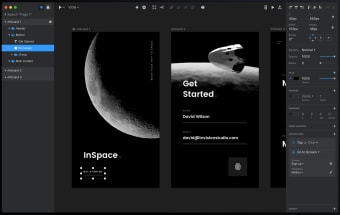
InVision Studio is a UX and digital design desktop application that lets you design websites, apps, and several other digital products.

Features and Capabilities

Available for both Windows and Mac, InVision Studio comprises both prototyping and design features. You may design layouts and elements and sprinkle animation and interactivity using the app’s simple and quick tools. You may work on different layouts for a particular screen type or size and see the design getting automatically adapted for other orientations and devices. The libraries of assets could be shared between teams, with updated elements getting rolled out across different designs. The designs could be uploaded quickly to InVision’s platform for seamless sharing with clients or people within an organization.

Easy and Seamless

InVision Studio works seamlessly with the remainder of InVision. Unlike other similar applications, InVision Studio not just focuses on aesthetics and graphics, but a lot of emphasis has also been put on animation and interactivity. These attributes make up the fabric essential for holding a design together. This integration with the wider platform is what differentiates this desktop application from other design tools. Moreover, InVision is also trying to beat the competition on the price front. The tool has been specifically designed to function as an app instead of a browser tool to make things easier for designers, since they can find it difficult to stay orientated when working within a tabbed browser.

  • Pros

    • Seamless integration with the InVision platform
    • Designed to work as a dedicated app
  • Cons

    • Heavy competition in the form of Photoshop
    • Illustrator
    • etc.

    • Small InVision user base
 0/1

App specs

Also available in other platforms

Program available in other languages


User reviews about inVision Studio

3.5

1 reviews

Add review

Main reviews for you

  • Anonymous user

    I seriously think that inVision Studio could easily take over Adobe Creative Studio because inVision Studio has a more easy to use configure and use tools that could only took some time to learn and use it to its full capacity unlike in Adobe Creative Studio which can took few days to deeply learn the use of the tools.

More

You may also like

Alternatives to inVision Studio

Explore Apps

Latest articles

Laws concerning the use of this software vary from country to country. We do not encourage or condone the use of this program if it is in violation of these laws.
Softonic

Is inVision Studio safe?

Score result: Clean

This file passed a comprehensive security scan using VirusTotal technology. It is safe to download.

  • Virus free
  • Spyware free
  • Malware free
  • Verified by Security Partners

    VirusTotal logo

Scan Info

Last scan
Wednesday, December 2, 2020
Scan provider
VirusTotal

Softonic security commitment

inVision Studio has been thoroughly scanned by our advanced security systems and verified by industry-leading partners. This file comes from the official developer and has passed all our security checks, showing no signs of viruses, malware, or spyware. For more information, visit our Security and Trust Center